-
27 October 2026 Small update: Copy Kanji to Clipboard
Tapping or clicking the kanji in the Edit Story area of the Study page now copies it to the clipboard and shows a brief "Copied!" tooltip. Hopefully this makes it just a tad little easier if you want to paste it in some other app or website.
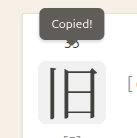
In theory it should also work on e-readers like Kindle. There is a fallback code that should take care of it, but I'm not sure as I don´t have a Kindle or e-reader to test.
Thanks to Felix for the suggestion. This closes issue #407 on Github. Leave a comment there or message me if you´d like to see any further tweaks to it, or if it doesn´t work as expected.
Dark Mode & Color Themes
Don´t worry I'm still working on Dark Mode. It is well under way. Finally trimmed all the 300+ unique colors down to a manageable palette of approx. 50 semantic tokens. Claude helped initially identifying all the unique colours but I still had to manually review them one by one or by small groups of very similar colors, in order to find the best semantic color (ie. is this a background color, is this a border? etc).
Did some small refactors along the way. The Custom Review summary now is updated visually so it re-uses exactly the same card grid layout as the View Lessons page.
Then Claude helped again just yesterday actually implementing the theme switching. So a page to select color theme (including Dark Mode), persisting the user's choice in the db, switching the theme in the web page. None of this is complicated, and all of it is completely unrewarding to write, it's pretty much all boilerplate code.
Very satisfying because I was worried Claude might not do a good job working on a 20 year old codebase, where I have a custom ORM that is not documented anywhere, plus the site is still using a completely outdated version of Symfony framework. I guess I am still learning to trust what the AI can do.
Some months ago I wrote documentation in the src/docs/ folder describing the various layers : front end, back end, database, etc. In addition to the main CLAUDE.md file which points to these docs. It seems like this really paid off: Claude wrote pretty much the same code I would have, using the existing patterns. I'm excited to see what more complex tasks I can do.
So yeah the Dark Mode theme is about 40% done. Dashboard looks nice. There just are a lot of intricacies, lots of smaller details here and there. Sometimes just a semantic token like "color for a title in a box" might work in light mode, but not in dark mode, so that means rethinking the semantic tokens so it's more flexible. Other times it's a visual thing. For example it's best to avoid very bright colors in Dark Mode, so the blue/red/green buttons use a color mix function with a chroma value, so the colors are less saturated in dark mode.
UPDATE: here is a preview of the Dashboard in Dark Mode. Let me know if you're not thrilled about where it's going, happy to make adjustments.
To block out the noise I'm coding to Echelon Protocol - State Azure (1 Hour Ambient Mix). Maybe you'll enjoy it!
By Month
- Oct 2026 (3)
- May 2026 (1)
- Apr 2026 (6)
- Mar 2026 (4)
- Jan 2026 (4)
- Dec 2025 (1)
- Mar 2025 (1)
- Nov 2024 (1)
- Sep 2024 (1)
- Jun 2024 (2)
- May 2024 (4)
- Apr 2024 (3)
- Mar 2024 (1)
- Feb 2024 (1)
- Dec 2023 (1)
- Nov 2023 (2)
- Oct 2023 (2)
- Apr 2023 (2)
- Mar 2023 (2)
- Feb 2023 (1)
- Jan 2023 (2)
- Dec 2022 (1)
- Nov 2022 (2)
- Oct 2022 (3)
- Sep 2022 (1)
- May 2022 (4)
- Apr 2022 (1)
- Feb 2022 (2)
- Jan 2022 (2)
- Dec 2021 (4)
- Nov 2021 (2)
- Oct 2021 (2)
- Sep 2021 (2)
- Aug 2021 (1)
- Apr 2021 (2)
- Feb 2021 (3)
- Jan 2021 (3)
- Dec 2020 (1)
- Nov 2020 (1)
- May 2020 (1)
- Apr 2020 (1)
- Jan 2020 (1)
- Oct 2019 (1)
- Sep 2019 (1)
- Aug 2019 (4)
- Jul 2019 (3)
- Jun 2019 (1)
- May 2019 (1)
- Mar 2019 (2)
- Jan 2019 (1)
- Nov 2018 (3)
- Oct 2018 (8)
- Sep 2018 (4)
- Aug 2018 (3)
- Jul 2018 (1)
- Jun 2018 (4)
- May 2018 (1)
- Apr 2018 (1)
- Mar 2018 (1)
- Jan 2018 (1)
- Dec 2017 (6)
- Nov 2017 (4)
- Oct 2017 (4)
- Sep 2017 (5)
- Aug 2017 (5)
- Jun 2017 (3)
- May 2017 (2)
- Apr 2017 (3)
- Mar 2017 (7)
- Feb 2017 (10)
- Jan 2017 (11)
- Dec 2016 (6)
- Nov 2016 (5)
- Oct 2016 (6)
- Sep 2016 (7)
- Aug 2016 (3)
- May 2016 (1)
- Mar 2016 (2)
- Jan 2016 (1)
- Dec 2015 (3)
- Nov 2015 (1)
- Oct 2015 (1)
- Sep 2015 (7)
- Jul 2015 (2)
- Jun 2015 (1)
- May 2015 (5)
- Apr 2015 (4)
- Mar 2015 (5)
- Feb 2015 (4)
- Jan 2015 (5)
- Dec 2014 (4)
- Nov 2014 (3)
- Oct 2014 (2)
- Jun 2014 (1)
- Apr 2014 (2)
- Mar 2014 (4)
- Feb 2014 (3)
- Jan 2014 (4)
- Dec 2013 (2)
- Oct 2013 (1)
- Sep 2013 (1)
- Jun 2013 (4)
- May 2013 (1)
- Mar 2013 (1)
- Jan 2013 (2)
- Oct 2012 (2)
- Aug 2012 (1)
- Jul 2012 (2)
- Jun 2012 (2)
- May 2012 (1)
- Mar 2012 (2)
- May 2011 (1)
- Apr 2011 (4)
- Mar 2011 (3)
- Feb 2011 (2)
- Jan 2011 (2)
- Dec 2010 (8)
- Nov 2010 (8)
- Oct 2010 (3)
- Sep 2010 (3)
- Aug 2010 (1)
- Jul 2010 (2)
- Jun 2010 (5)
- May 2010 (1)
- Apr 2010 (3)
- Mar 2010 (4)
- Feb 2010 (2)
- Jan 2010 (1)
- Dec 2009 (5)
- Nov 2009 (5)
- Oct 2009 (1)
- Aug 2009 (1)
- May 2009 (5)
- Apr 2009 (2)
- Mar 2009 (1)
- Feb 2009 (2)
- Jan 2009 (2)
- Nov 2008 (1)
- Oct 2008 (1)
- Sep 2008 (1)
- May 2008 (2)
- Apr 2008 (1)
- Feb 2008 (6)
- Jan 2008 (5)
- Dec 2007 (6)
- Oct 2007 (1)
- Sep 2007 (2)
- Aug 2007 (3)
- Jun 2007 (1)
- May 2007 (5)
- Apr 2007 (1)
- Mar 2007 (2)
- Feb 2007 (1)
- Jan 2007 (4)
- Dec 2006 (3)
- Aug 2006 (1)
- Jun 2006 (3)
- Apr 2006 (6)
- Mar 2006 (8)
- Feb 2006 (1)
- Jan 2006 (4)
- Nov 2005 (1)
- Oct 2005 (4)
- Sep 2005 (1)
- Aug 2005 (11)